

Capture screen
Select a tab or window with the QR visible. We detect and parse the OTP secret automatically.
Vauzy generates and stores TOTP codes right next to the credentials they protect. Access is fast, secure, and fully auditable, with zero master passwords to manage.
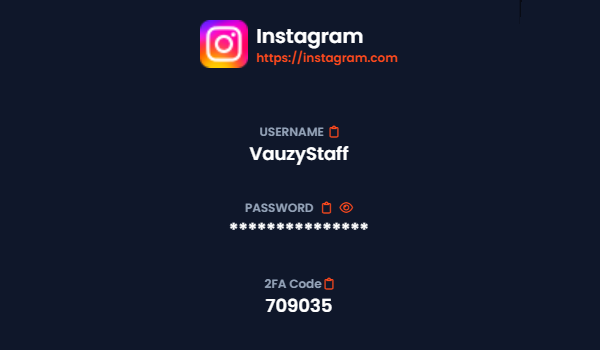
See the current 2FA code right where you store the credential, with one-tap copy and audit logging.
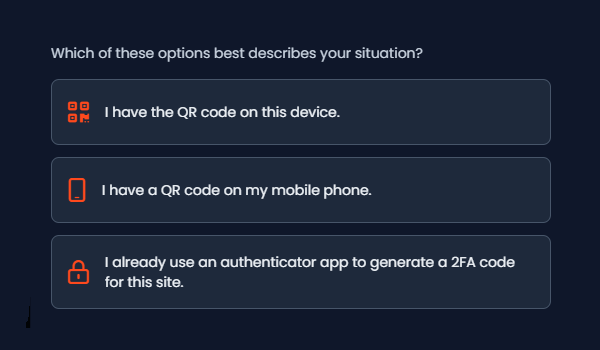
Our capture wizard makes adding 2FA codes effortless, whatever device or app you're using.
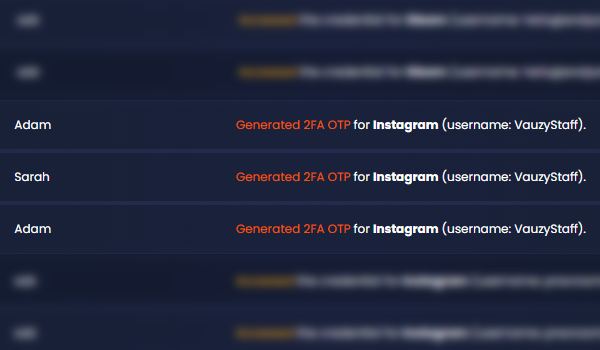
Every code reveal and setup action is logged, so you can show exactly how access was handled.
We have created an easy to use capture wizard with five capture options, plus imports from populate authenticators. Pick what's quickest for you.
Select a tab or window with the QR visible. We detect and parse the OTP secret automatically.
We'll guide you to take a quick screen snippet, then paste or upload it. The wizard extracts the code in seconds.
Send a magic link to your device. Use the mobile camera to scan the QR on your desktop. Results sync back automatically.
Point your webcam at the QR on your phone. Not ideal, but it works when other options aren't available.
We'll send an SMS with instructions to screenshot and upload. The wizard extracts the secret and links it to your credential.
Bring codes from Google Authenticator, Authenticator+, and other apps that support exports. Keep everything in one place.
Capture
Use any capture method or import file. We securely parse the QR or OTP URI and store the secret encrypted.
Pair
Link the 2FA secret to its credential or service account. Access rules and vault boundaries apply automatically.
Use
Get fresh TOTP codes when you need them. Every reveal is recorded in the audit log with user, time, and IP.
Vauzy generates and stores TOTP codes right next to the credentials they protect. Access is fast, secure, and fully auditable, with zero master passwords to manage.
Yes. We parse standard otpauth URIs from QR codes, screenshots, and imports, then generate 30-second TOTP codes inside Vauzy.
Use paste or upload, or the mobile magic link. You can also enter the secret key manually if the provider shows it.
Use our capture wizard to quickly add 2FA codes to your credentials. We support all standard TOTP QR codes, screenshots, and imports, then generate 30-second TOTP codes inside Vauzy.
Yes. We support imports from compatible exports, consolidating your codes alongside their credentials.
Every reveal is logged with user, action, timestamp, and IP. That transparency protects both you and your clients.
Capture and manage 2FA codes with ease, easily give secure access to your team and clients.